Bilingual

During the daytime work hours my daughter, Beatrix, is taken care of at the home of a young lady (whom I will call “CJ” for the reasons of safety and privacy) and her son, who is about a year and a half older than Beatrix. We think the world of her (of both of them actually). She treats Beatrix with the same love, kindness and compassion she displays for her own child. She is extremely active and loves to take them to museums, parks, zoos, play dates – basically anything to keep them the happiest of children. It’s perfect.

CJ is from England and still has a very proper accent. Being an unabashed Anglophile myself, this only helps solidify her position as a permanent addition to our extended family. It has also been a fascinating experiment in the nature of language learning and linguistics with the test subject being Beatrix.

You see, when Beatrix is around CJ or, in conversation discussing anything related to CJ or her son, she uses British terms in place of American ones where a difference exists. For instance…

  • Shopping Cart = Trolley
  • Trash Can = Rubbish Bin (Bin for short)
  • Diaper = Nappy
  • Trunk = Boot

When she is with us or speaking to us, she uses the American phrase. In other words, she has become bilingual in two versions of the English language and, at age two and a half, knows which of these two “languages” to speak based upon the others in conversation with her.

For those of you who are in bilingual homes or have immersion school/daycare experience, this may be just the way it works. That said, to see it happen within the confines of a language that is largely shared is a fascinating peek into the way the brain works and how important it is that we expose our children to such experiences at the earliest age possible.
My iPhone Productivity Folder

As you may have noticed from the trickle of posts the past few weeks, my work life has me very busy right now. In the over ten years I have been running my computer consulting business, this has been the busiest summer ever. I’m certainly not going to complain because, when one works for themselves, busy is a good thing. It’s just very unusual because summer is usually my slowest time so I find myself wholly unprepared for it.

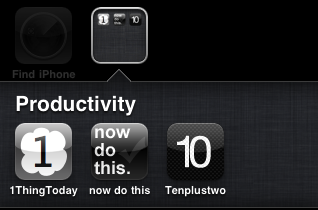
That said, when I find myself overwhelmed, I find that the most beneficial thing I can do to stay on top of things is to reduce my normal task system to one that has low barrier to action, less items, and tremendous focus. It also has to be portable without adding to my existing daily arsenal of items. Lately, three iPhone applications have been fitting that bill and helping me to achieve modest goals.

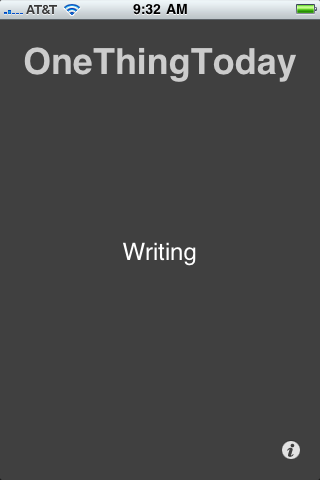
One Thing Today — This is the recently released iPhone version of a daily goal manager, the desktop version of which I have featured here before. Here, for each day, I put the one goal or project that has my attention. This is for more of a high level thing like “Writing” or “Capture and Clear”. Just something to boot my brain into the proper mode for the day ahead. It’s simple but I find it very effective.

Now Do This (iTunes Link) — This is where I put the three to five things I wish to accomplish for the day. Once listed, the app will display them in large type on the screen in the order listed one task at a time. Swipe a checkmark on the screen to mark the task complete or a circle to send it to the bottom of the list. This really helps me to stay on task and I find it best to just launch this app and keep it launched so I see what I should be doing next whenever I unlock the phone.

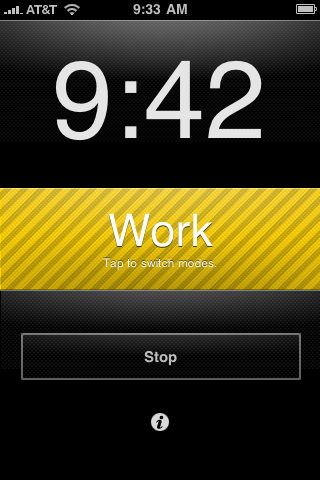
Tenplustwo — This is a simple timer built around the (10+2)*5 procrastination hack invented my Merlin Mann. The idea is to alternate 10 minutes of work with 2 minutes of play thus gaming yourself into getting 50 minutes of work done. When I need a little help getting through that list, this is how I do it.

The Everywhere Else Machine

Some of you may remember my mentioning, slightly before the release of the iPad, that I planned to use it as my main portable machine, replacing and relegating to the desktop my three year old Macbook. I have had many requests for an update on how that is going. Instead of some full blown, windbagging post about every boring detail of how I use this thing, I offer a series of observations that I hope will be insightful:

  • What I have found is that the iPad has in fact become what I have come to think of as my everywhere else machine. In other words, when I am sitting at my desk, in my home office, I use my Macbook. Everywhere else, the living room, the den, at a client, at a coffee shop — I use the iPad. This means I use it quite a lot but there are certainly some things I wait to do on my Macbook (web development stuff for instance). That said, this is more a limit of available apps then the iPad itself. Most of what I do, which constitutes writing, browsing, social networks, and email, can easily be done on the iPad (and in some cases it’s even better). My Macbook rarely leaves the desk.

  • Though the pairing of Apple’s Wireless Keyboard with the iPad is a fantastic mobile experience, I rarely do so unless I have a massive amount of writing to do. I find the onscreen keyboard, especially in landscape orientation, just as fast (I typed this whole post exactly this way). Now, your mileage may y on this. I never learned how to touch type and, instead, am a very fast two finger typist. Therefore, I tend to adapt to keyboards of ying types and sizes quickly. If you are a strictly traditional typist who has only ever typed by resting your hands on the home row, it will take a while to break yourself of this habit.

  • Much has been said about how fast the iPad is, not enough has been said about why that speed matters. Speed makes a huge difference not just in the time to launch apps, load web sites, etc. but also in making the many real world metaphors the iPad employs feel natural. Turning the pages of a virtual book would seem far less like turning the pages of a real book if they did not, in fact, keep up with your gestures the way a real world page does. Same with swiping through a “stack” of pictures. All of this on screen manipulation would be less impressive if not “real time”.

  • Speaking of landscape orientation, that is how I most often use mine (and with the home button to the right). I generally only hold it in portrait when I am reading in Instapaper or a magazine app. In other words, when using it “as a computer” I hold it landscape. When using it “as paper” I use it portrait. I have found in my informal polling and observations that most of those people do the same. As with above, I find Apple’s inclusion of this feature central to the real world metaphors the iPad employs to feel natural.

  • The last two items here are the “magical” part of the equation with this thing. What happens for me is that, after a few seconds of use, the device itself seems to disappear. Suddenly, I am holding whatever app I am using in my hands. It’s a bit hard to describe unless you actually use an iPad for a while but, once again in my informal polling, I have found it to be universally true amongst those I have asked.

  • Related side note: Google kind of confuses me. Why use the pre-iPad time you obviously had to work on an iPad optimized interface to GMail when Gmail’s HTML mode experience is perfectly useable (and, I would argue it is even more so) on a device and screen this size? Why not instead make sure Google Docs, Sheets, etc. work instead? I use GMail in HTML mode on the iPad all the time. Works like a charm. Serious missed opportunity here since both Pages and Numbers on the iPad are expensive and difficult to get data in and out of. Google could have made their cloud apps work and served up ads to two million people with a better solution.

  • I’m sure you have heard this from other iPad owners but I can confirm it, if you take your iPad out in a public place, expect many interruptions from the curious and covetous. Seriously, people can not help themselves from interrupting you, asking questions about it, etc. What I find most interesting is that almost everyone who has done so with me are folks who obviously are not geeks or what we geeks would consider computer savvy.