History
Dash/Plus |sfref|referrer|kdtad
is a metadata markup system I created for paper based notes to mark the status of action items on a todo list. It quickly evolved to be equally well versed at marking up meeting notes for easy scanning and processing. This is mainly designed for those who keep lists or take notes using pen or pencil and paper.
I first wrote about this system in a 2006 whitepaper that outlined most of my productivity tools and methods at the time. Much has changed since then but the dash/plus system remained steadfast and is still in use by me (and many others now) every day. Yet, there was no place that it alone was fully outlined and permanently lived. This post now changes that.
Practice
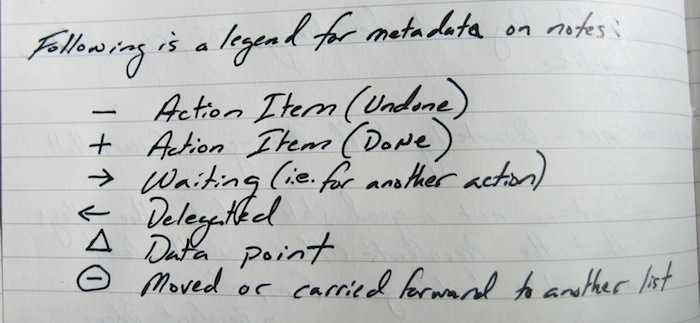
(Dash): Undone Action Item — Individual items (action items and ideas) are marked with a dash preceding them. All items, no matter what they are, are therefore treated as items to be processed.
(Plus): Done Action Item — If the item is an action item (todo), when the item is complete, a vertical line is drawn through the “dash†thus making it resemble a “plusâ€. This makes the dashed items stand out quite well despite the fact that the same color pen or pencil may be used.
(Right Arrow): Waiting – (i.e. for another action) — Drawing an arrow pointing to the the item denotes that it is something that is waiting on another action to happen or deliverable.
(Left Arrow): Delegated — Drawing an arrow pointing to the left of the item denotes that it has been delegated (with a note to whom and the date) .
(Triangle): Data Point — Turning the dash into a triangle denotes a data point (a fact or figure you wish to remember for instance).
(Circle) — A circle around any of the above means that it has been carried forward, moved to another list or otherwise changed status – i.e. a “Waiting†item has now become an Action Item elsewhere (with a note about where that item has gone).
The beauty of this system is that it is all built upon, and extensions of, the original dash. Therefore, it is easy to change items from one state to another (an undone action item to a done one, an undone action item to waiting or delegated) and in the case of an non-dashed item changing completely the item is circled to denote that.
Resources
Extending Dash Plus — Wherein I describe ways in which I, and others, have extended the system to fit new needs.
DashPlus for iPhone — Dave Mendel’s excellent list app based on the Dash/Plus system. Proceeds from sales go to School-In-A-Box — an educational initiatives to bring iPads and learning materials to developing nation communities.
soypunk » Using Dash/Plus Markers on iOS and OS X — Shawn Medero’s really clever trick of implementing the system using Unicode and the built-in text expansion tools.
Hybrid Journal / James Gowans — James Gowans has mashed up Dash/Plus with the popular Bullet Journal system. Useful things occurred.
Recommended Items
Levenger Annotation Ruled Paper is ideal for meeting notes and lists. It is a loose Cornell Style arrangement that has spaces at the top for Topic, Date, File Under and Page Number and a wide left hand margin that is perfect for the dash/plus system. Levenger’s Circa system also comes with the same annotation ruled paper by default. I use (and love) both! Also, the paper is bright, thick and takes ink from a fountain or gel pen easily.
Praise for the Dash/Plus System
It is incredibly simple. The dash means it is still to do. Adding another mark makes it done, delegated, waiting, moved or canceled. No messy crossing out of the entire item. One mark…I’m done.
– Joe Ely, Director of Operations at Cook Biotech, Inc
It is the first system I’ve found that lets me successfully manage capture and todos in the same workspace. There is no fear of missing critical data or overlooking a task.
– Jason Rehmus
…sexy “dash/plus†notation system for identifying item status.
– Merlin Mann of 43 Folders
Dash/plus is simple, yet flexible & adaptable to your own needs. Pen & paper or digital, it “just works”
– Stephen Smith of In Context MultiMedia
If you have found the Dash/Plus System helpful, or if it makes your day just a little bit easier, please consider a free will donation of any amount.

This work is licensed under a Creative Commons Attribution-NonCommercial-ShareAlike 3.0 Unported License.